Hero eyebrow
textSmall introduction above the Home heading.
- Default
- For the everyday appetite
THE SUPPER HANDBOOK
Install your theme, make it yours, and share something good.
Start with quick setupSupper is a Food & Recipe Journal theme for Ghost: a home for everyday cooking, seasonal recipes and stories from your kitchen. This guide takes you from a fresh theme installation to publishing and maintaining your own site.
Start with the quick setup, then use the chapter list or guide search when you need a specific answer. No build tools are needed to install the supplied theme ZIP. Basic recipes use Ghost’s normal editor blocks.
supper-0.7.4.zip, plus the supplied routes.yaml. A documentation archive is a separate download, not the theme to upload.Before changing an established site, back up its content, images, active theme, settings and routes. Keep a copy of template edits. Try the theme on a staging site first if you already have custom collections or important URLs.
Supper’s interface and the recipe heading convention are English. The current compatibility range is Ghost >=6.0.0 <7.0.0; this guide does not claim Ghost 7 compatibility. Admin labels may vary between Ghost versions. Use the Settings search if a label has moved.
/recipes/, Kitchen journal → /journal/, Our table → /about/.#recipe, a public primary tag, native Ingredients/Method blocks and your own content.#seasonal, #weeknight and #journal as explained in Home setup. Leave at least one recipe unreserved for the hero.about and update your author profile.Do not expect the theme upload to create posts, pages, tags, navigation or editor Snippets automatically. Those belong to your publication.
your-site-domain/ghost/.supper-0.7.4.zip without extracting that installable archive.If your browser automatically unzips downloads, locate the original ZIP or download it again. If your purchase contains a larger product bundle, extract that outer bundle and upload only the installable Supper theme ZIP inside it.
Official reference: Installing a Ghost theme.
Routes create the curated Home, recipe collection and kitchen journal. Keep a download of your current routes before replacing them.
routes.yaml supplied alongside the theme. You can also extract a copy from the theme ZIP./, /recipes/ and /journal/ to confirm the new layout.| Address | What it displays |
|---|---|
/ | Curated Home, using the Home template. |
/recipes/ | Published posts with the internal tag #recipe. |
/journal/ | Published posts without #recipe. |
/{slug}/ | An individual post; its tag selects recipe or journal presentation. |
/tag/{slug}/ | A native tag archive. |
/author/{slug}/ | A native author archive. |
routes:
  /:
    template: home
collections:
  /recipes/:
    permalink: /{slug}/
    template: custom-recipes
    filter: tag:hash-recipe
  /journal/:
    permalink: /{slug}/
    template: index
    filter: tag:-hash-recipe
taxonomies:
  tag: /tag/{slug}/
  author: /author/{slug}/
Official reference: Ghost content collections.
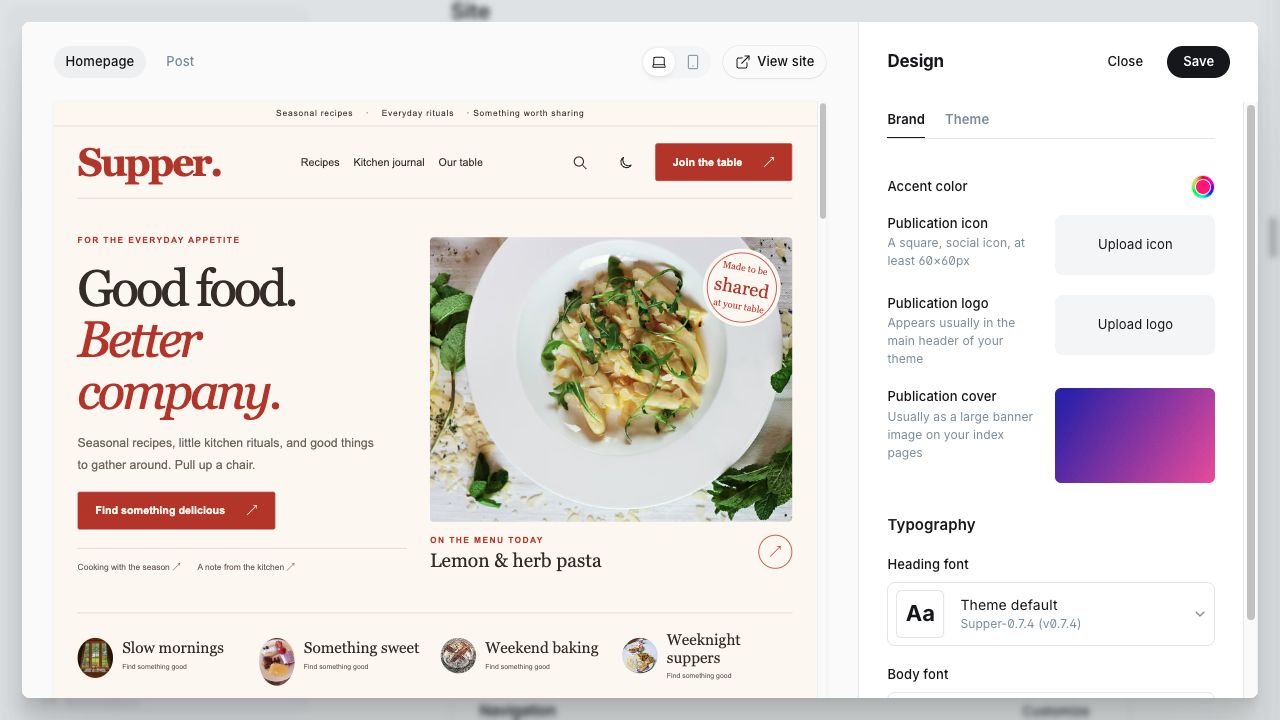
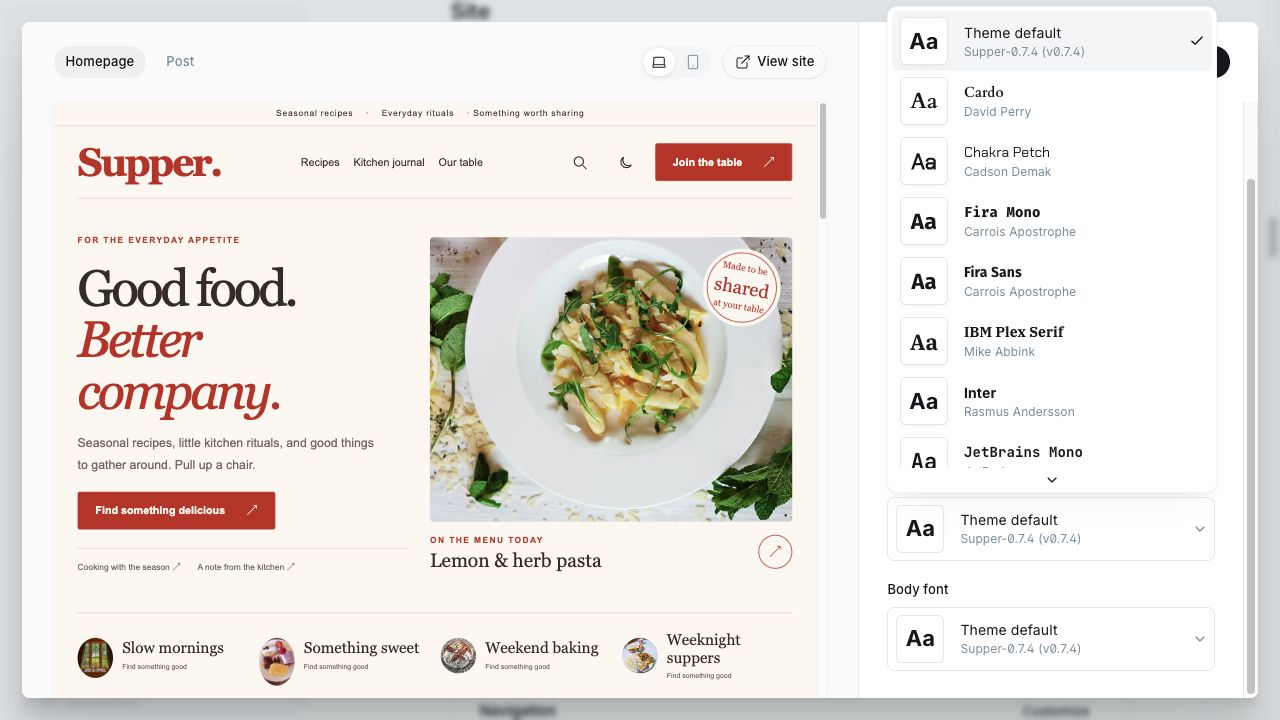
Open Settings → Design & branding and choose the Brand tab. Set the publication icon and logo, then choose Heading font and Body font under Typography. Save the changes. Change the publication title in the site’s general settings.
The header uses your uploaded logo; if no logo exists, it uses the site title. The footer uses the site title. Choose a logo that stays legible against both light and dark backgrounds. Use the native preview and check the mobile header rather than relying on the uploaded image’s original dimensions.
Ghost supplies the selected heading and body fonts. Theme default uses Georgia/serif for headings and Arial/sans-serif for body text. Keep font choices readable for quantities, fractions and long instructions.
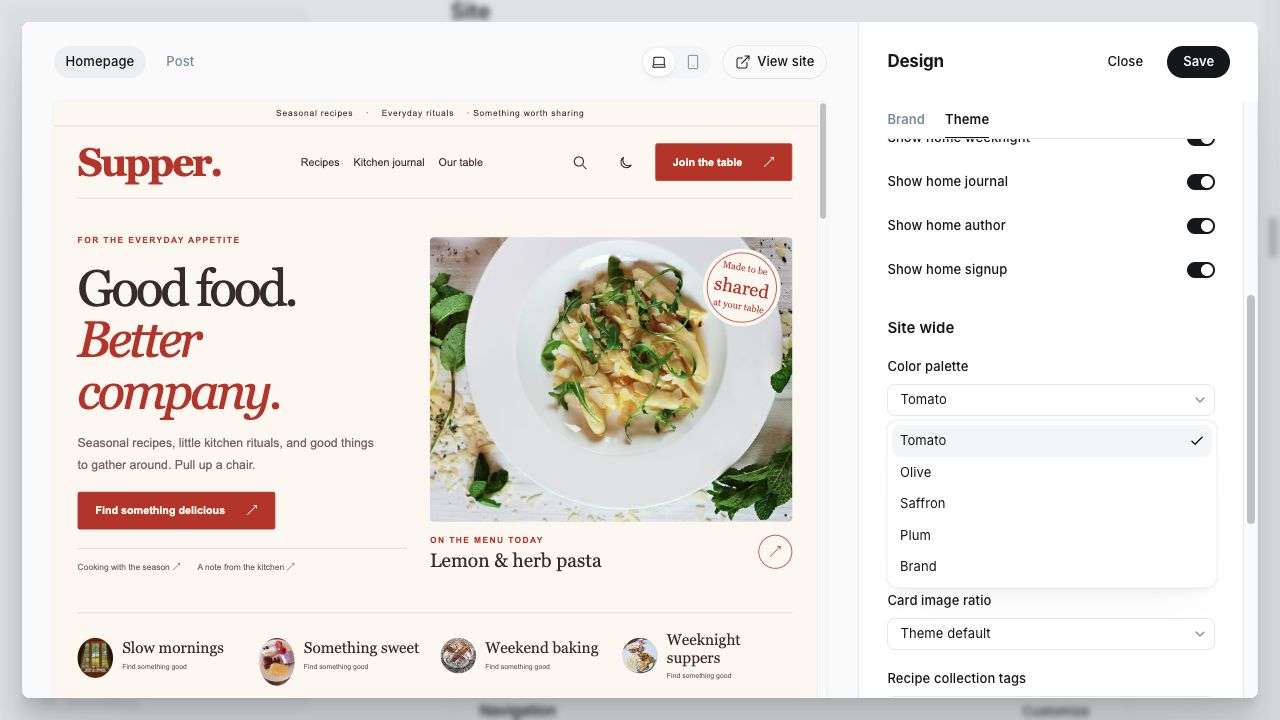
To use Ghost’s native accent color, set Theme → Site wide → Color palette → Brand. Tomato, Olive, Saffron and Plum use their own light/dark accents. Brand may adjust an unreadable accent toward the text color; the displayed accent is not guaranteed to match every input color exactly.
Default color scheme is the starting choice for new visitors. A visitor’s saved header-toggle choice takes precedence. System follows their operating system until they make a manual choice. Use a fresh private window when checking a changed default.
Supper also provides presentation styling for supported native Search, Portal and Comments frames. Those applications still own their forms, account and discussion behavior; arbitrary third-party embeds do not inherit every theme choice.
Official reference: Ghost design settings.
These are unedited captures from the Supper 0.7.1 installation. The controls are unchanged in 0.7.4. On a small screen, open an image to read its original full-size controls.
Home is assembled from posts and author/tag information. You do not edit it as an ordinary Page, and the block order is fixed. Configure its copy and visibility in Theme → Homepage.
| Block | Content rule | Maximum |
|---|---|---|
| Hero / On the menu today | Newest #recipe post without #seasonal or #weeknight. | 1 |
| Fresh from the kitchen | More recipes from the same general pool, excluding the hero. | Off / 2 / 4 / 6 / 8 |
| Browse by occasion | Public tags with feature images. Separate from Recipe collection tags. | 4 tags |
| The seasonal table | #recipe + #seasonal. | 3 recipes |
| The weeknight edit | #recipe + #weeknight, without #seasonal. | 4 recipes |
| Kitchen journal | #journal posts without #recipe. | 2 posts |
| Meet the cook | First author of the hero recipe, using their profile and bio. | 1 author |
| Signup / account panel | Native membership panel; heading from Signup heading. | 1 panel |
Publish at least one unreserved recipe for the hero, several more unreserved recipes for Fresh, up to three seasonal recipes, up to four weeknight recipes, and two journal stories. Add images to the public tags you want in occasion links and fill in the hero author’s profile.
Empty optional sections are omitted and limits are maximums. If every recipe is reserved, the hero has no eligible post and Meet the cook has no lead author. The Ghost Featured toggle does not select these Home posts; the template uses tags and publication order.
Turning off Show home signup affects Home only. Other page signup panels remain separate and also depend on native membership being enabled.
Keep Ingredients and Method in English. The checklist recognizes a native H2 beginning with Ingredients and bulleted lists before the next H2. Do not put the entire recipe inside a Markdown or HTML card: the checklist intentionally skips card contents. Nested subitems remain ordinary bullets.
On the published site, readers can check ingredients, see progress, reset the list, jump to ingredients and enter Focus mode. The optional contents list uses actual H2 headings. Checklist state resets on reload. Focus mode does not keep a device screen awake.
Download the recipe block checklist

Prep time, cooking time and yield are your authored facts, not automatic estimates. Basic recipes work without this panel.
recipe-facts class. Save the card as a Recipe facts Snippet if you want to reuse it.<div class="recipe-facts">
<div><small>Preparation</small>YOUR PREP TIME</div>
<div><small>Cooking</small>YOUR COOKING TIME</div>
<div><small>At the table</small>YOUR YIELD OR SERVINGS</div>
</div>
Download the optional facts template
Values might be 15 minutes, 35 minutes and 4 bowls for your own tested recipe; these are examples, not universal defaults. Use No cooking when accurate. Remove a field’s entire inner <div>…</div> line for an unknown value, or omit the whole card. Never publish placeholder words.
This optional workflow requires editing the short HTML text in the card. Supper does not add dedicated cooking-time form fields in Ghost Admin. Without JavaScript, facts remain readable where you placed them in the article. No facts card means no empty metadata panel.
Facts are part of the accessible recipe body. They are not included in the guest recipe body when the post is restricted. The theme does not generate Recipe JSON-LD, calculate nutrition, convert units or scale quantities.

Once you have created your native recipe blocks, select the body content and choose the snippet icon in Ghost’s editor toolbar. Name it Recipe starter. To insert it into another post, use the slash menu and select the saved snippet, or type /Recipe starter on a blank line and choose it from the menu.
Save the optional facts card separately as Recipe facts if useful. After insertion, replace all placeholder text and use the card’s Edit control to change its HTML values.
Snippets copy body content only. They do not set a post’s title, excerpt, tags, access, author or feature image. Add #recipe to each new recipe. Changes to a saved snippet do not rewrite older posts.
The files in Downloads are authoring helpers, not a Ghost import file. Theme installation does not install the local demo’s Snippets into your site.
Official reference: Ghost reusable snippets.
A recipe normally has a public tag such as Weeknight suppers and the internal tag #recipe. Public tags appear on the site and get archive pages; internal tags control selection behind the scenes. Add a clear tag name, slug, description and feature image in Ghost’s Tags area.
Set Recipe collection tags to comma-separated public tag slugs, for example:
weeknight-suppers,vegetable-forward,weekend-bakingUse existing slugs without # prefixes or spaces inside a slug. Up to eight matching tags appear as navigation links. Ghost determines their returned order; this field selects which tags appear, not their manual order. Leave it blank to keep only All recipes.
The links open native tag archives with pagination. A tag archive can include journal stories as well if you assign that public tag to them. It is not a combined filter for cooking time, diet or ingredients.
Related recipes match the current post’s primary public tag and #recipe, excluding the current post. Related journal stories match the primary tag but exclude #recipe. No primary tag or no matching posts means no related block. Use Show related posts and Related posts limit in Post settings; the limit is an upper bound.
Create an ordinary Post without #recipe. It uses the journal article layout and appears in /journal/. Add the internal tag #journal if it should also be eligible for Home’s journal block.
Set the title, feature image/alt text, custom excerpt, author and body in Ghost. The journal archive follows publication order, with a lead story and remaining entries without duplicating that lead on the same page. The Featured toggle does not select the lead.
Use native headings, paragraphs and supported editor cards for stories. Reading time describes the article; it is never presented as cooking time. The journal article includes native Comments and related journal stories when available.
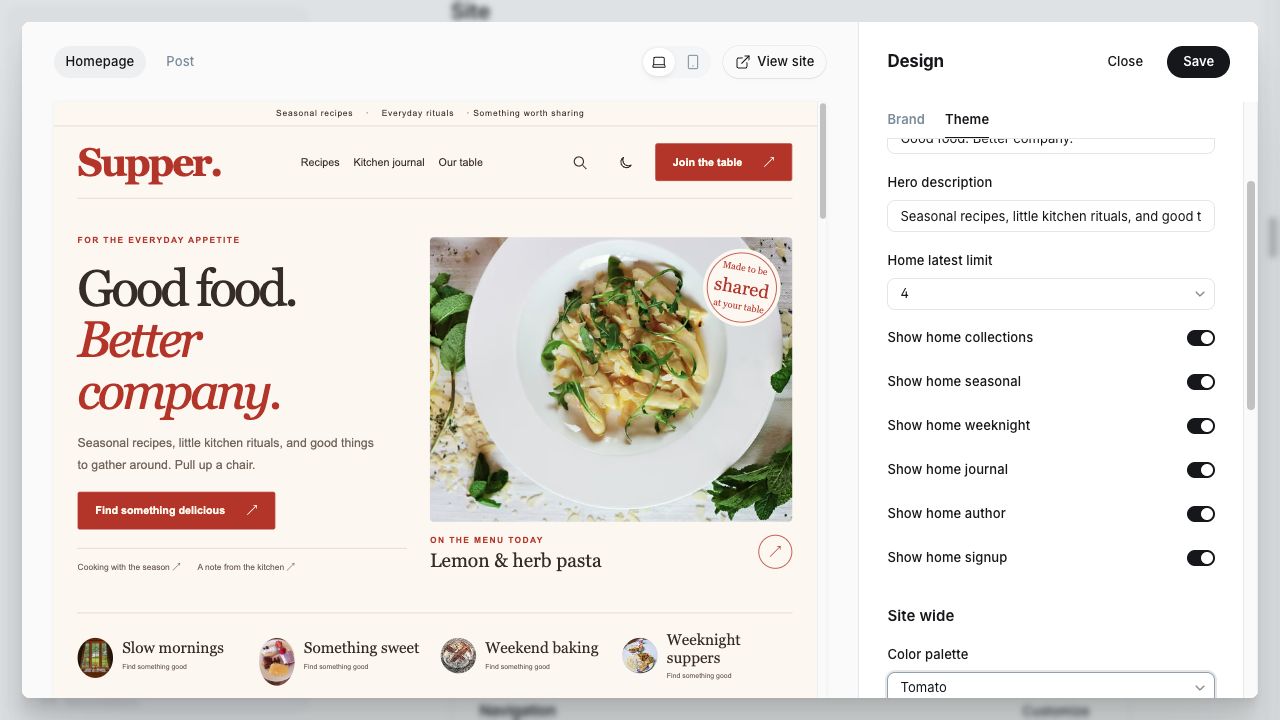
Open Design & branding → Theme. Supper has 10 Homepage, 7 Site wide and 3 Post settings. Save after previewing. Native Brand controls, Navigation and membership settings are separate.
Small introduction above the Home heading.
Main Home title. The original default gets its designed line break and italic second line; custom text wraps naturally.
Introductory paragraph beside the Home lead recipe.
Maximum eligible Fresh recipes, excluding the hero and reserved seasonal/weeknight pools. Off hides Fresh; fewer eligible posts means fewer cards.
Shows up to four public tags with feature images as occasion links. Separate from recipe category navigation.
Shows up to three recipes tagged #recipe and #seasonal, when available.
Shows up to four #recipe + #weeknight posts without #seasonal, when available.
Shows up to two #journal posts without #recipe.
Shows the first author of the Home lead recipe, using the native profile.
Shows the Home signup/account panel when membership is enabled. Other page panels are independent.
Tomato, Olive, Saffron and Plum use preset accents. Brand uses the native accent with readability adjustments.
Initial mode for visitors without a saved preference. Their header-toggle choice takes priority; System follows their OS until manual selection.
Standard or larger body text in recipes, journal, About and ordinary pages; ingredient labels also increase. It does not enlarge every navigation label.
Controls recipe/card grid images: Landscape 4:3, Square 1:1, Portrait 4:5, or the designed default. Hero/editorial compositions keep their own shapes.
Up to eight existing public tag slugs, comma-separated. Selects category links, not order. Empty keeps All recipes only.
Shared heading for signup/account panels across the theme.
Short description below the footer site name.
Recipe contents navigation from actual H2 headings. The block remains absent when there are no matching headings.
Shows related content on recipe/journal posts when matches exist.
Maximum 2, 3 or 4 related posts. Ignored when Show related posts is off; the field may remain visible in Admin.
The screenshots below show the actual 0.7.4 controls alongside their live preview. Scroll the right-hand panel to move between Homepage, Site wide and Post. Save only after making your own intended changes.
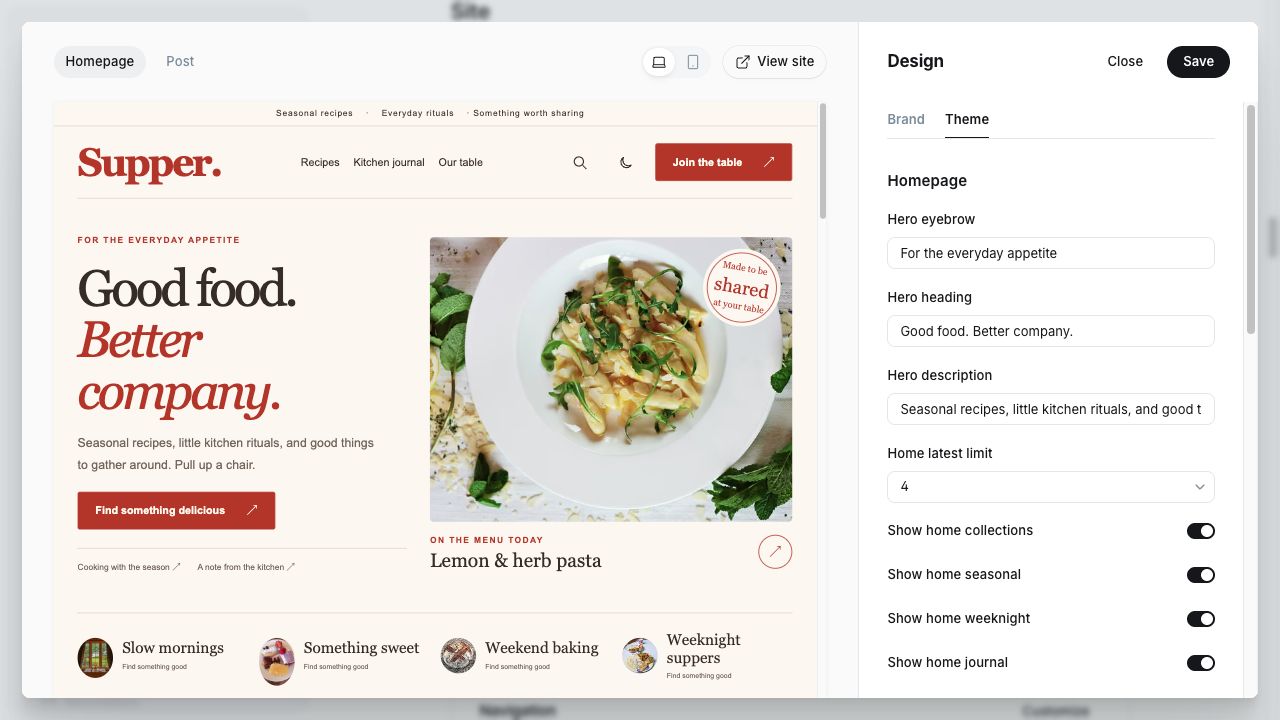
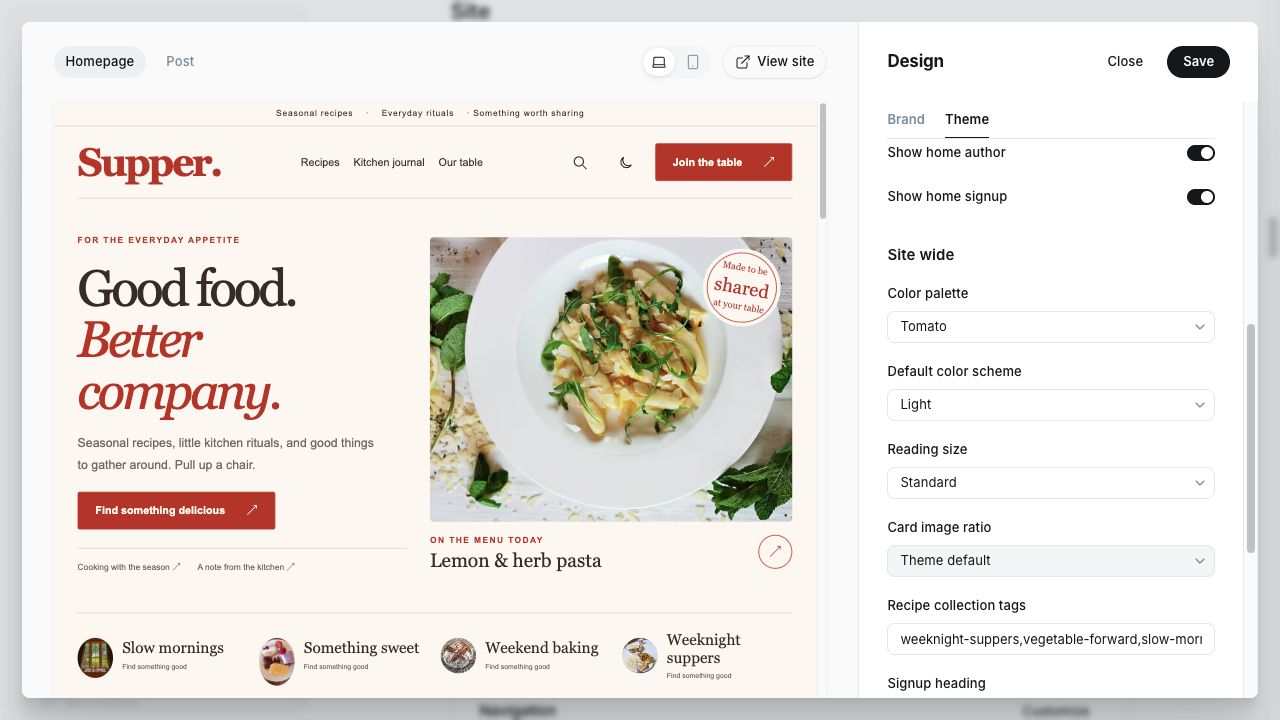
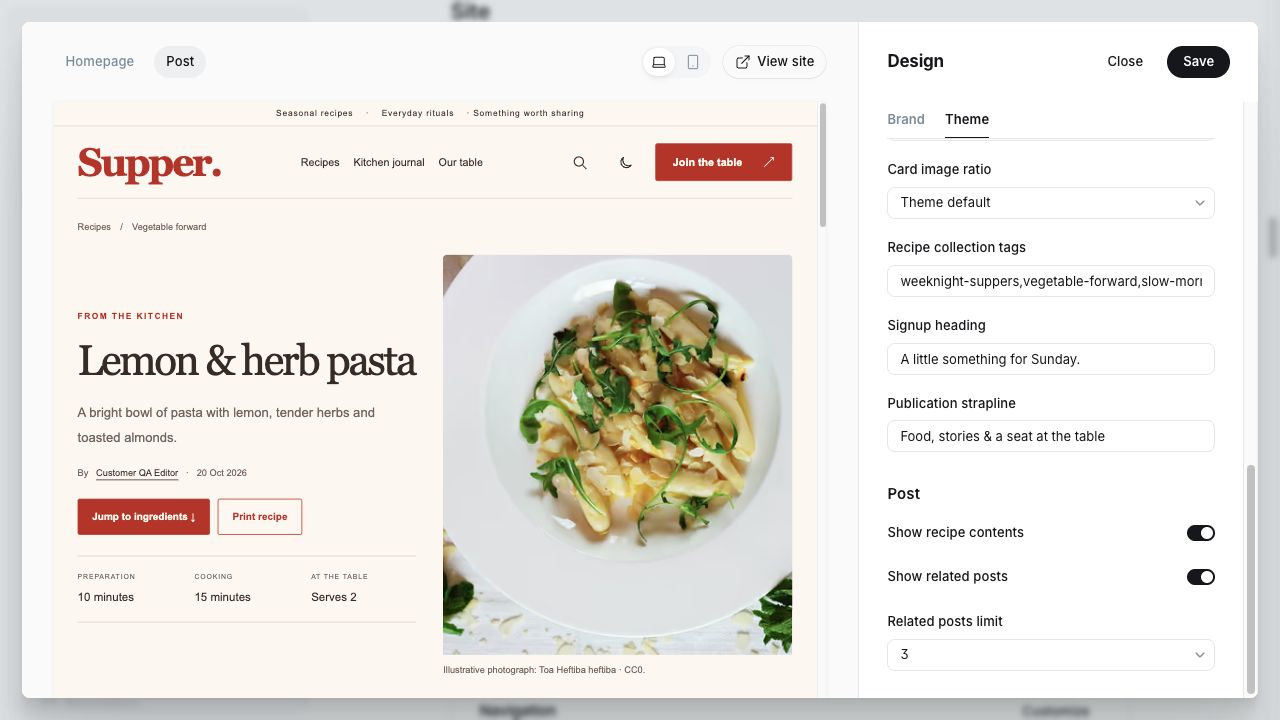
Configure membership access and Portal in Ghost’s native settings. The theme provides signup/account links and access-aware templates; it does not create a separate account system.
Members sign in through Ghost’s email flow; depending on its current Portal version, the email can provide a link and a six-digit verification code. Administrative password recovery is a separate Ghost flow. The theme does not store member passwords or deliver email itself.
Signup/account panels are shown only when native membership is available. Show home signup affects the Home panel; disabling native membership affects membership-dependent controls throughout the theme.
Signup/sign-in messages are transactional mail. Newsletter delivery is configured separately in Ghost; a working SMTP account does not automatically configure bulk newsletter sending. For self-hosted newsletters, follow Ghost’s documented Mailgun setup. Supper styles your website, not the email newsletter template.
Paid tiers and checkout use Ghost’s own Stripe integration and require a supported Stripe setup. Buying Supper does not configure a payment account. Validate checkout and tier access on your own staging setup before selling paid subscriptions. Supper’s current tests do not certify a completed production payment lifecycle.
Restricted ingredients, method and authored facts stay outside the guest recipe body. Images and files uploaded to Ghost are ordinary web assets: a member gate is not private file storage.
References: Ghost mail configuration and Ghost memberships.
Use the header magnifying glass or Find a recipe button. Search is Ghost’s native application and searches the publication, including journal stories. It is not a recipe-only ingredient or dietary search engine.
Join the table opens signup; Your account opens the signed-in account view. You can add native links such as #/portal/signup, #/portal/signin and #/portal/account where needed. Their behavior follows your Ghost membership configuration.
Enable Comments in Settings → Membership → Access, choosing the audience permitted by Ghost. Native Comments appear in accessible recipe/journal articles. Readers need an eligible signed-in membership to contribute; Ghost handles moderation and notifications.
Test Search, Portal and a real comment after configuring your own publication. If an embedded app fails, check its network requests, Ghost settings and browser extensions, then compare in a current standard browser. Do not install development iframe adapters or patch Ghost core as part of normal theme setup.
Official reference: Ghost Comments.
Use the native editor for images, gallery cards, quotes, tables, video, audio, toggles and other Ghost cards. Keep Ghost’s normal card assets available; Supper loads article styles on posts and pages. Third-party embeds still depend on their provider.
Use only media you can publish and redistribute as needed. The separate demo package includes CC0 photographs under its supplied licenses; the theme code license does not override those rights. Remove fictional people, sample facts and placeholder content before launch.

Drafts and scheduled posts do not appear in public Home/collection queries until published. Previewing a change does not necessarily save Design settings; use Save there. The theme does not override Ghost’s scheduling or newsletter-recipient controls.
Open an accessible recipe and choose Print recipe. Inspect your browser’s print preview before printing. Supper removes site navigation and surrounding panels, using a light paper layout. The accessible article and notes print; it is not a shortened recipe-card export. Browser headers/footers, paper size and margins are controlled in the print dialog.
Set meaningful titles, excerpts, feature images and metadata in Ghost’s native post/site settings. Supper retains Ghost’s normal head/footer integration and uses semantic article structure. Check the public URLs and redirects when moving an existing site.
Supper does not automatically generate Recipe structured data. Native article metadata is not Recipe JSON-LD. Do not assume a recipe’s checklist or cooking facts make it eligible for Google recipe rich results. No nutrition, rating or timing values are invented by the theme.
For a fast site, upload appropriately sized/compressed images, keep the number of font families small, limit heavy third-party scripts/embeds and use sound hosting/caching. Measure the public HTTPS site with realistic content, including an article as well as Home. Scores vary with hosting, network, content and Ghost’s native applications; no fixed PageSpeed score is guaranteed.
Check link and focus visibility, keyboard navigation and your chosen colors whenever you customize the design. Theme checks do not certify every author-selected background, embed or image overlay.
Static JPEG priority covers use responsive AVIF derivatives with a WebP fallback; other priority covers and occasion icons use WebP, all generated by Ghost. Lazy photographs retain their source format to avoid recompression growth; original uploads and image licenses remain unchanged. Home preloads its actual selected lead image and uses smaller occasion icons. Lazy images have low fetch priority. Recipes containing native card markup retain their native editor-card assets, as do other posts and pages. Plain recipes skip the unused card CSS/JS bundle. Search, Portal and Comments remain available.
Home and reading views embed partials/home-styles.hbs copied from assets/css/screen.css. Reading views also embed partials/content-styles.hbs from assets/css/content.css. If you edit CSS and zip manually, update these partials too; the workspace product builder regenerates them automatically. Collection pages retain the cacheable external stylesheet. The supplied ready-made ZIP needs no build step.
Start with editable sample content using the separate Supper demo ZIP. It contains 12 recipes, 2 Kitchen journal stories, Our table and Photo credits pages, 6 public collection tags, 5 internal tags and 19 locally packaged CC0 photographs. Recipe bodies use native Ghost headings and lists, so Ingredients checklists, Method, the table of contents and Focus mode work without an external recipe plugin.
supper-0.7.4.zip in Theme settings.supper-demo-0.7.4.zip. Upload the ZIP itself, without extracting it or choosing export.json separately. It belongs in Universal import, not the theme uploader. Wait for completion and review any import report.#recipe; every imported post/page has #supper-demo. Ghost may add its own dated import tag. Existing content is retained.about if Ghost imported it as about-2. Review all actual slugs before linking. Draft the default Coming soon post if you do not want it in Kitchen journal./recipes/, Kitchen journal → /journal/, Our table → /about/. Add Photo credits → /photo-credits/ in secondary navigation.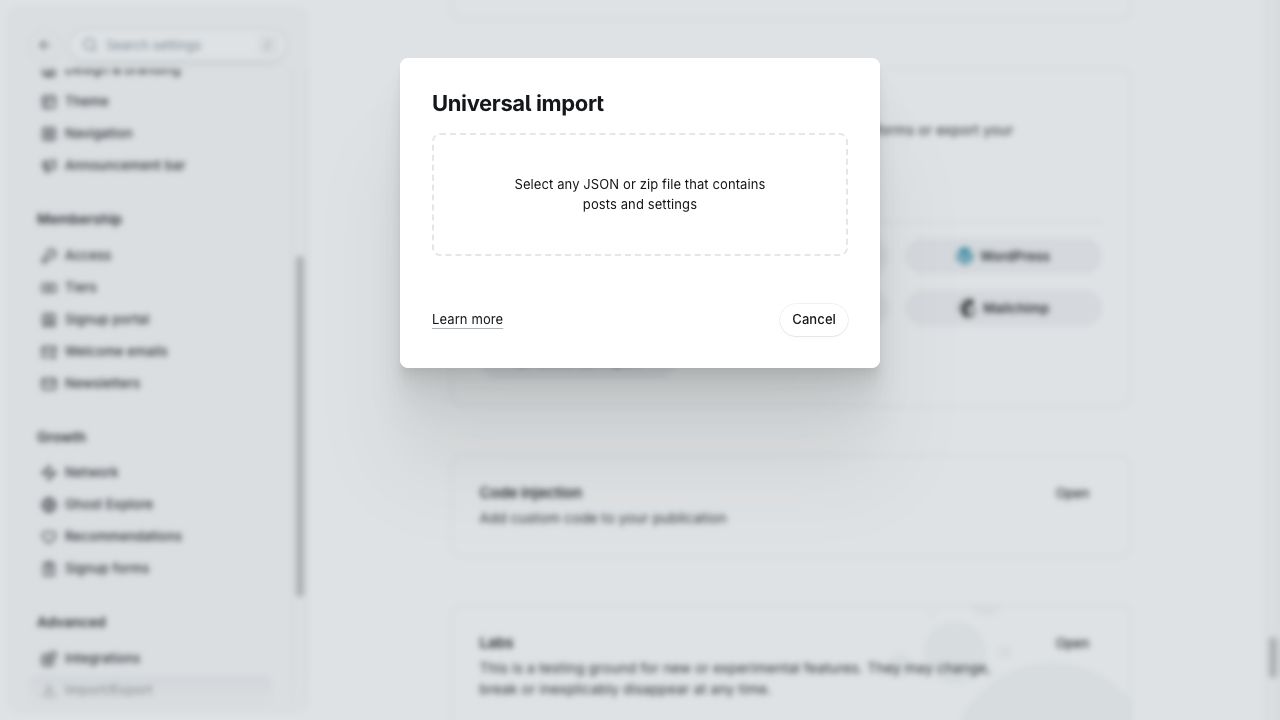
The demo has one general recipe for the hero and four further general recipes for Latest. Three recipes carry #seasonal; four carry #weeknight. These pools are separate, so the default Home does not repeat a recipe. Two posts use #journal without #recipe. Four public tags have images for the occasion links. Keep these tags when editing the samples, or follow the Home chapter to build your own pools.
All 19 photographs are packaged locally and listed as CC0 on their individual Wikimedia Commons source pages. See the supplied credits and CC0 terms. Images illustrate the layout and may show different preparations; photographers did not test or endorse the sample recipes. Original sample prose may be copied, edited and published with your site. Review recipes, quantities, facts, allergies and food safety before publishing your own production content.
Import once. Re-importing can create duplicates and suffixed slugs; it does not synchronize or update earlier samples. To remove demo content, identify posts with #supper-demo, inspect Pages separately, and remove only confirmed samples. Keep any shared tags or images still used by your own content. A site backup is the reliable rollback option.
The package contains no users, members, comments, credentials, mailing lists, site settings, subscriptions or payment data. Snippets, navigation, routes, Brand, theme settings and transactional email need normal manual setup.
Use Admin for routine changes. Keep a record of any template/CSS modifications so they can be reapplied when updating the theme.
| Change | Where |
|---|---|
| Site identity, logo, heading/body fonts | Ghost’s site settings and Brand tab. |
| Hero text, Home visibility and latest limit | Theme → Homepage. |
| Palette, default mode, reading size, card ratio and signup title | Theme → Site wide. |
| Recipe contents and related post visibility/limit | Theme → Post. |
| Recipes, stories, About content and author bio | Native post/page editor and author profile. |
| Header/footer navigation labels | Primary and Secondary navigation. |
| Announcement strip and hero button wording | partials/header.hbs and home.hbs. |
| Fixed Home section headings/cook introduction | home.hbs. |
| About principles and fixed editorial invitation | page-about.hbs. |
| Shared signup description and eyebrow | partials/signup.hbs. |
The fixed announcement strip at the top of Supper is template copy; Ghost’s separate Announcement bar feature does not edit that text. There is no visual page builder or drag-and-drop block ordering. Some wording intentionally requires template editing because the 20-setting set focuses on the main publishing workflow.
For small custom CSS, Ghost Code Injection may be appropriate. For template edits, keep an editable backup of the theme, update only the intended files, then zip the theme files with package.json at the archive root and validate before uploading. Do not rename custom setting keys casually: upgrades can lose values associated with removed keys.
A theme update does not intentionally replace your posts, images or members. It also does not preserve edits made inside the old uploaded theme folder automatically. Keep documentation and authoring helpers with your product files rather than uploading the documentation ZIP as the theme.
Start with the symptom below. Check the theme version and Ghost version before changing code. Never share passwords, tokens or private member data in a support report.
Activate Supper, upload its routes.yaml separately and verify the navigation destination. Do not create competing pages named recipes or journal.
Publish eligible #recipe posts and check their images. Leave at least one recipe without #seasonal/#weeknight for the hero. Confirm routes and the relevant Home switches.
Fresh excludes the hero and both reserved tag pools. Its limit is a maximum. Remove the reservation tag if that recipe should rejoin the general pool.
Add the mandatory internal #recipe tag. Template selection alone does not change routing.
Use a native Heading 2 beginning with Ingredients and native bulleted lists before the next H2. Do not wrap the recipe in HTML/Markdown cards. Make sure the viewer can access the recipe and JavaScript is allowed.
Use the optional HTML card with class recipe-facts, replace all placeholder text, then save the post. Omit the card when not needed. The theme does not create facts automatically.
Use an existing public tag slug in Recipe collection tags, without #. Only up to eight matching tags are shown. Home occasion cards instead require public tags with images.
Enable the related block and assign a primary public tag. Publish other matching posts of the same recipe/journal type. No matches means the block stays hidden.
A visitor’s saved header-toggle choice wins. Test with a fresh private browser window. System follows the OS only until a manual choice.
Check native membership availability and the Home signup switch. Configure Portal and signup access in Ghost. The theme does not create membership settings.
Check Ghost transactional mail, sender configuration, spam folders and host/provider logs. Newsletter settings are separate. Ask the host to verify delivery; do not put SMTP passwords in theme files.
Request a fresh sign-in email and try its actual sign-in link in the same normal browser. Check the site URL, Ghost version and server logs with your host. The clean Ghost 6.72.0 SQLite test showed INVALID_OTC_VERIFICATION_HASH while the email link worked; Supper does not include a core patch or claim this is fixed on every installation.
Check Comments access, eligibility, blockers and native app/CDN loading in a standard current browser. An embedded app-browser observer error also occurred with Ghost’s Source control theme during local testing. Report the browser and Ghost version; no private local adapter is required for customer installation.
Save Brand and Theme changes. Choose Brand palette for the native accent; named presets use their own accents. Check cached assets, font loading and card-specific formatting.
The current Supper menu is single-level. Nested labels/prefixes are not a supported dropdown configuration.
Print uses the accessible article, including notes and supported content. It is not a separate abbreviated recipe card. Check browser margins and headers/footers in print preview.
This is your publication setup checklist, not a claim that all production hosting/payment combinations have already been tested by the theme author.
Contact Atelier Themes at contact@atelierthemes.com. Include the theme version, Ghost version, affected public URL, browser/device, a screenshot and steps to reproduce. If you have an order reference, include it. Share only the minimum information needed; never email credentials, API keys or member exports.
Describe whether the issue concerns theme layout, authoring, hosting/email, a native Ghost application or custom code. Your host or the relevant platform provider may need to help with server configuration and account/payment delivery. Your purchase includes 12 months of email support and access to released updates from the original purchase date. Continued use of versions lawfully received is allowed after that period; renewal is optional, with no automatic recurring charge. See License, support and refunds for the Single Website terms and the voluntary 14-day refund promise, including requests after download or customization. Mandatory statutory rights remain unaffected.
Guide prepared for Supper 0.7.4 · 29 October 2026 · English edition.